How Each System Works
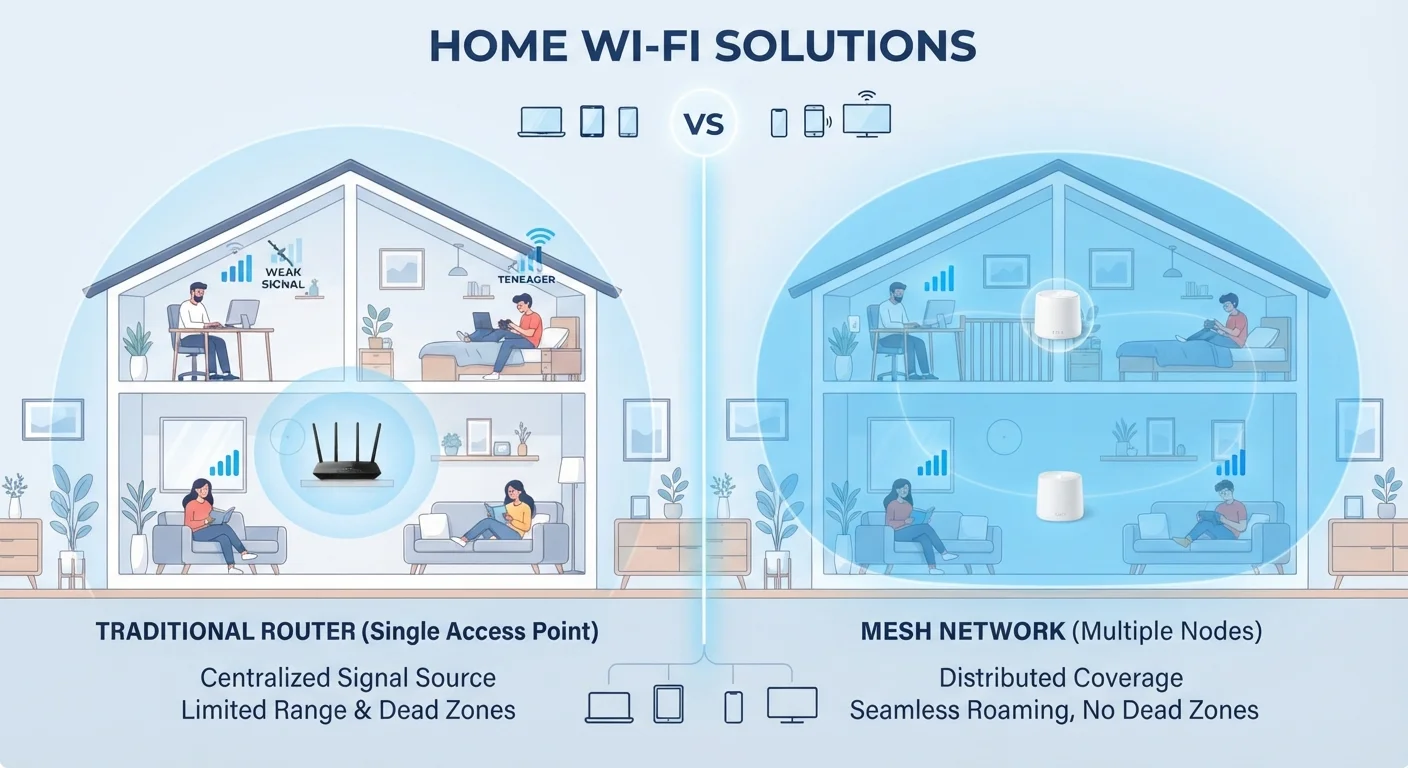
A traditional router connects to your modem and broadcasts a Wi-Fi signal outward from a single point. The further you move from it — or the more walls stand between you and it — the weaker that signal becomes. Placement matters enormously here; see our guide to router placement and configuration for the principles that make a real difference.
A mesh Wi-Fi system replaces (or supplements) that single router with a set of nodes — typically two to four units — distributed around your home. Each node communicates with the others, creating one unified network with a single network name. Your devices hand off seamlessly between nodes as you move through the home, much like how your phone transitions between cell towers without you noticing.
The backbone that connects mesh nodes to each other can be wireless (using a dedicated radio channel) or wired via Ethernet. A wired backhaul is faster and more reliable, though it requires running cables between nodes.
How They Compare Across Key Criteria
The table below breaks down how the two approaches stack up across the factors that matter most to everyday users.
| Traditional Router | Mesh System | |
|---|---|---|
| Typical coverage area | Up to ~1,500 sq ft reliably | 2,000–6,000+ sq ft with multiple nodes |
| Upfront cost | Lower (single unit) | Higher (multiple nodes) |
| Setup complexity | Simple — plug in and configure | Moderate — place nodes, configure app |
| Dead zone elimination | Limited by single broadcast point | Designed specifically to eliminate dead zones |
| Device roaming | Manual network switching in some cases | Seamless automatic handoff between nodes |
| Advanced configuration | More granular settings available | Simplified app-based controls |
| Best for | Smaller homes, fewer devices | Larger homes, many devices, complex layouts |
One point worth emphasizing: coverage area is the single biggest differentiator. In an apartment or compact single-story home, a traditional router placed centrally can reach every corner. In a 2,500-square-foot multi-story house with thick walls, that same router will almost certainly leave dead zones — exactly what mesh systems are designed to eliminate.
When a Traditional Router Is Enough
Don't let marketing pressure you into a mesh system you don't need. If your home is under roughly 1,500 square feet and mostly open-plan, a quality traditional router — positioned centrally and elevated off the floor — can deliver strong, consistent coverage throughout. Common myths about Wi-Fi speed often lead people to assume they need expensive hardware when the real fix is smarter placement.
Try Placement Before You Buy New Hardware
If you're experiencing weak signal in one or two spots, moving your existing router to a more central, elevated location often delivers a dramatic improvement at zero cost. Avoid tucking routers inside cabinets, on the floor, or behind large appliances — all of these absorb and block signal. Only consider new hardware after you've optimized placement first.
Traditional routers also tend to offer more granular configuration options, which is appealing if you enjoy customizing settings like Quality of Service (QoS) — a feature that prioritizes certain types of traffic, such as video calls over background downloads. And since the hardware is a single unit, there's less to troubleshoot when something goes wrong.
If your main frustrations are speed-related rather than coverage-related, running an Ethernet cable to your most demanding devices (gaming consoles, desktop computers) often solves the problem without any new hardware.
When Mesh Makes Sense
Mesh systems genuinely earn their price premium in homes where a single router simply cannot do the job — large square footage, multiple floors, thick concrete or brick walls, or layouts with long hallways and separated rooms. If you've already experimented with optimal router placement and still have dead zones, a mesh system is a logical next step.
They also simplify device management. Rather than manually connecting to a range extender's separate network (a common workaround with traditional setups), every device on a mesh network sees one network name and connects to the strongest node automatically. For households with dozens of smart home devices, this seamless roaming is a real quality-of-life improvement.
Understanding how Wi-Fi bands behave across those nodes is helpful too. Our guide to 2.4 GHz vs. 5 GHz Wi-Fi explains how mesh nodes use different bands to balance range and speed for each device.
~30%
Signal loss through a typical interior wall
Wi-Fi signal attenuation through standard drywall can reduce strength by roughly 30%, with brick or concrete causing significantly steeper drops.
25+
Average connected devices per U.S. household
According to Deloitte's Digital Media Trends research, the average American household has connected more than two dozen devices to its home network.
Making the Right Choice for Your Home
Before upgrading anything, answer two questions: Where are the weak spots in your current coverage? and How large and complex is your home's layout? If your only problem is a slow connection in one room adjacent to your router, repositioning the router or adding a single wired access point may be all you need. If you have multiple floors or multiple rooms with no usable signal, a mesh system is a more durable solution.
Also consider the number of connected devices in your home. A household running 30 or more simultaneously connected devices — phones, tablets, smart TVs, thermostats, cameras, and more — benefits from the load-balancing that mesh systems handle automatically.
Finally, remember that both setups benefit from the same foundational maintenance. Periodically restarting your router or mesh nodes clears accumulated connection issues that quietly degrade performance over time — regardless of which system you use.