What These Two Licensing Models Actually Mean
When you pay for software, you're not always buying the same thing. The word license is the key: it describes the terms under which you're allowed to use a piece of software, not necessarily who owns it. Two dominant models govern how most consumer and professional software is sold today.
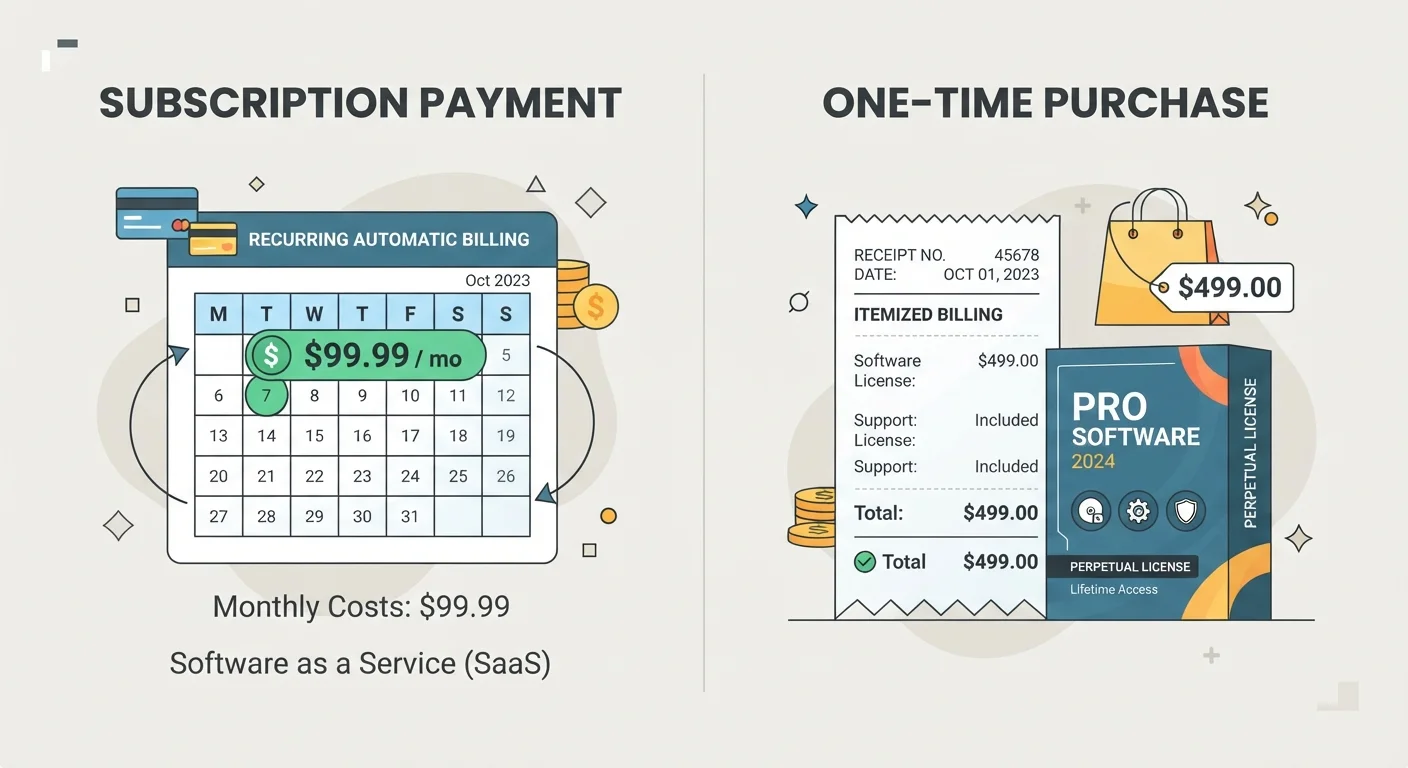
Subscription software — sometimes called Software as a Service (SaaS) — charges a recurring fee (monthly or annually) in exchange for continued access. Stop paying, and access is typically revoked. In return, you generally receive automatic updates, new features as they ship, and often cloud storage or multi-device syncing built in.
Perpetual license software means you pay once for the right to use a specific version of an application indefinitely. The software doesn't expire, but neither does it automatically gain new features. You own that version — but future major releases typically require a new purchase or an upgrade fee.
Understanding this distinction matters more than ever because many software companies have shifted toward subscriptions over the past decade, sometimes discontinuing perpetual options entirely. Knowing what you're agreeing to before you pay is the first step to making a confident decision. For a related look at what "free" licensing actually costs you, see The Hidden Costs of Free Apps.
Breaking Down the Real Costs Over Time
On paper, a one-time purchase looks cheaper. In practice, the math depends entirely on how long you use the software and what version you need.
| Criterion | Subscription Software | One-Time Purchase Software |
|---|---|---|
| Payment structure | Recurring monthly or annual fee | Single upfront payment |
| Access if you stop paying | Revoked immediately | Retained indefinitely |
| Feature updates | Automatic and continuous | Fixed; major updates cost extra |
| Security patches | Ongoing while subscribed | Until vendor ends support |
| Cloud/multi-device sync | Typically included | Rarely included |
| Long-term cost (3+ years) | Higher cumulative spend | Lower if no upgrade needed |
| Best for | Frequent, evolving use cases | Stable, well-defined tasks |
Consider a hypothetical: a perpetual license costs $150 upfront. A subscription for equivalent software runs $10 per month. At that rate, the subscription surpasses the one-time cost at the 15-month mark — just over a year. After three years, you've paid $360 for the subscription versus $150 for the perpetual license. But the subscription user has had every update, every new feature, and potentially cloud backup included.
That equation shifts if the perpetual license vendor releases a major new version (which you'd need to repurchase) or if the subscription price increases — both common occurrences. It also shifts if you only use the tool for six months, in which case the subscription is the clearly cheaper path.
~15 months
Typical break-even point vs. one-time purchase
At common pricing ratios, a monthly subscription often surpasses the equivalent perpetual license cost within one to two years of continuous use.
2–4 years
Average major version release cycle for perpetual software
Many traditional desktop applications release major paid upgrades every two to four years, which can add significantly to the true cost of a perpetual license.
The honest answer is that neither model is inherently more expensive — your usage pattern determines which one costs you more. If you're already juggling multiple subscriptions, a structured audit can help clarify what you're actually paying for. The Subscription Audit walks through exactly that process.
Updates, Security, and What Happens When Software Gets Old
One dimension buyers often overlook is what happens to the software over time — especially for perpetual license users. When a software product reaches a point where the vendor stops issuing updates for it, that version is considered to have reached end of life. Security vulnerabilities discovered after that point won't be patched, which can expose your data or device. What "End of Life" Software Really Means explains when this becomes a genuine problem for users on older versions.
Subscription software largely sidesteps this issue because vendors have a financial incentive to keep the product current — if they stop improving it, subscribers cancel. Updates are pushed automatically, and users are nearly always on the latest, most secure version.
Perpetual Licenses Still Require Maintenance Decisions
Owning a perpetual license doesn't mean owning a worry-free product forever. Vendors typically support only the current and one prior major version. Once your version falls outside that window, security fixes stop arriving. Review the vendor's stated support policy before committing to a perpetual purchase, especially for software connected to the internet or used with sensitive data.
Perpetual license holders are not automatically at risk, but they do bear more responsibility for monitoring their software's support status and deciding when an upgrade is necessary. For users in regulated industries or those handling sensitive personal data, this is a more pressing concern than for casual home users.
Practical Questions to Guide Your Decision
Rather than treating this as a universal debate, use these questions to clarify which model fits your situation:
- How often will you use this software? Daily users extract more value from a subscription's continuous improvements. Occasional users pay less overall with a one-time purchase.
- Do you need multi-device access or collaboration features? These are almost always subscription-tier perks.
- How important are new features to you? If the current version does everything you need, locking in a perpetual license is logical. If your work evolves, a subscription keeps pace.
- What is your budget structure? Some people find it easier to absorb a single annual fee rather than a large upfront cost — or vice versa. Consider how automating recurring payments fits into your financial setup.
- What's the vendor's track record? A subscription is only as reliable as the company offering it. If a vendor shuts down, subscription access ends immediately; a perpetual license continues working even without vendor support.
If software costs are part of a broader money-tracking habit, digital money-tracking tools can help you keep subscription spend visible and intentional.